Factories > Factory agents
Configuring factory agents
Configure a factory agent's instructions, tools, model, and harness, including authentication for Claude Code and Codex.
Change how an existing factory agent works by editing its instructions, tools, and runtime in the Warp Factories web app or its definition files.
Prerequisites
Section titled “Prerequisites”- Editor access to this factory, or team or workspace admin access.
- An existing factory agent. See About factory agents for the default roles, or Creating custom agents to add a role.
Edit agent settings and instructions
Section titled “Edit agent settings and instructions”For a Warp-managed factory, edit agent settings in the web app. For a GitHub-backed factory, settings are read-only in the web app; edit the factory definition files instead. See Where the definition lives.
-
In the web app sidebar, click your factory to expand it, then click Agents.
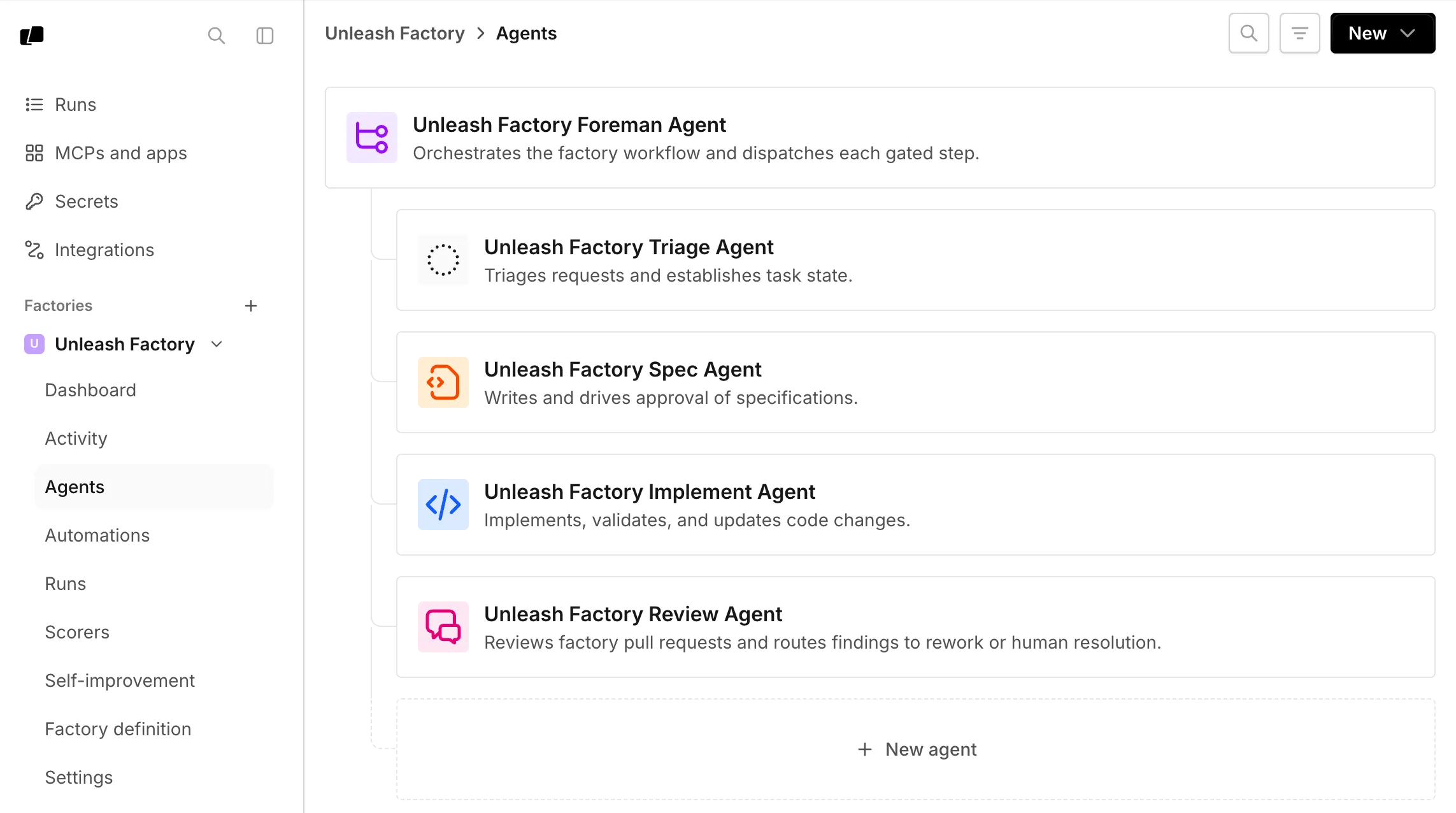
The Agents page lists a factory’s foreman and default agents. -
Click an agent to open its Settings tab.
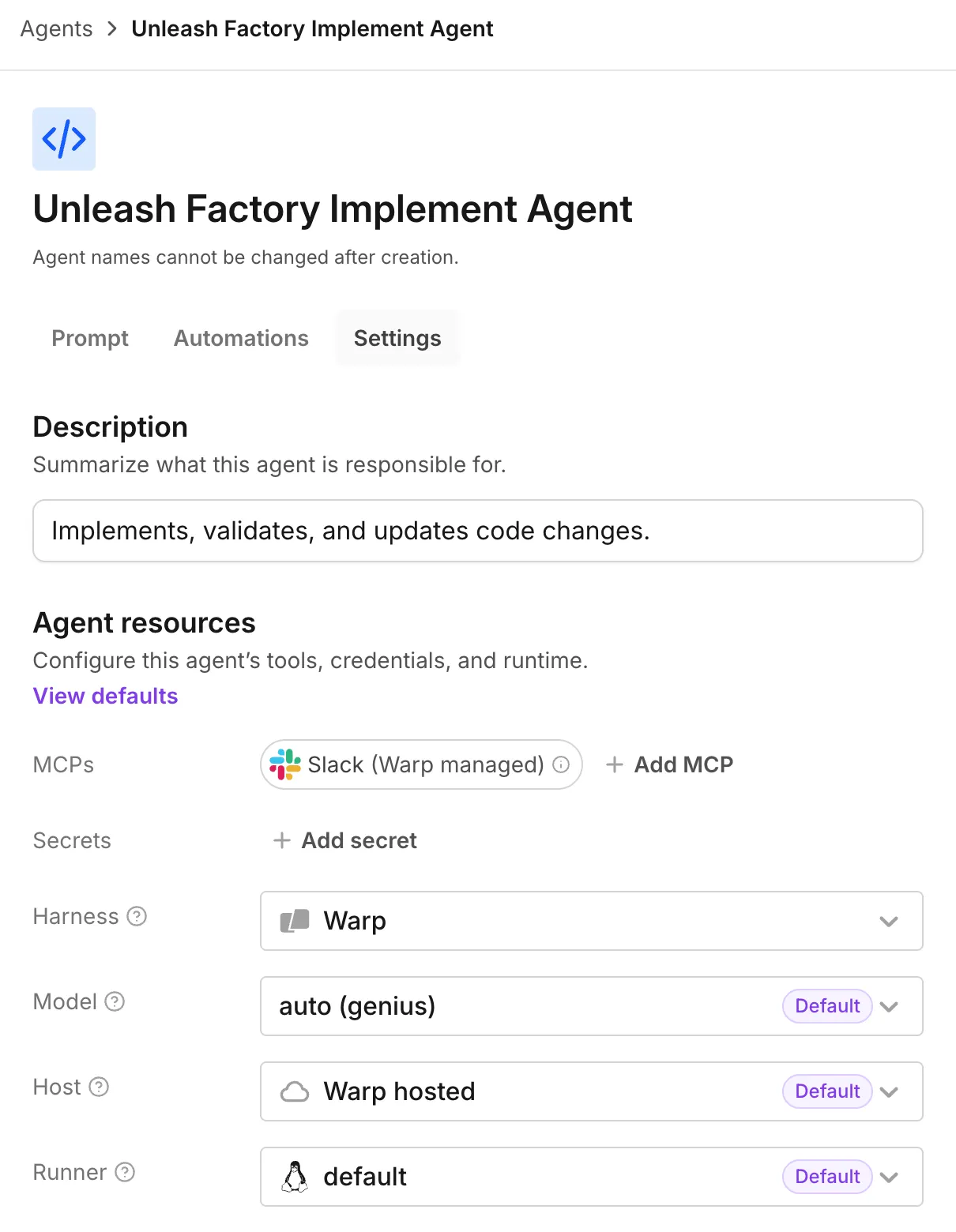
The Settings tab contains the agent’s description and resources. -
Edit the agent description, harness, model, runner, host, MCP servers, or secrets.
-
To change the agent’s instructions, click Prompt and edit the prompt.
-
In the top-right corner, click Save.
Choose models and harnesses per agent
Section titled “Choose models and harnesses per agent”Choose each agent’s model and harness in its settings. Supported harnesses include the Warp Agent, Claude Code, and Codex. A foreman using Claude Code or Codex can still dispatch other factory agents, whose runs are tracked as its children.
Third-party harness access depends on your team’s plan and workspace settings. If a harness requires an upgrade, use the Warp Agent or review Warp pricing.
Default model IDs change over time, so choose based on what each agent has to do well:
| Agent | What to optimize for |
|---|---|
| Foreman | Orchestration, instruction following, and long-running conversations |
| Triage | Research, evidence gathering, and working with connected tools |
| Spec | Synthesizing requirements, technical reasoning, and precise writing |
| Implement | Coding strength, with a harness that fits your repositories and toolchain |
| Review | A different model or harness from the implement agent, so the two don’t share blind spots |
The model picker also includes custom routers from factories you can access. See Agent model choice, Custom routers, and Agent harnesses for available options.
For team-managed inference in definition files, see custom endpoint and BYOK model values, including factory defaults and per-agent overrides.
Reviewing inference for provider ZDR
Section titled “Reviewing inference for provider ZDR”Start with factory ZDR coverage and its limits. The procedures below remove known model exceptions from settings you control; they don’t certify coverage for every auxiliary request. Both work in a browser without Warp Terminal.
Before using Self-improvement with sensitive run data, ask Warp to confirm its separate analysis model and provider coverage. It doesn’t inherit the foreman’s model.
Reviewing a dashboard-managed factory
Section titled “Reviewing a dashboard-managed factory”For a Warp-managed definition, you need the editing access listed above. Use the model exception list when making each selection.
- Open the Warp Factories web app and expand your factory in the sidebar. In Agents, open each agent’s Settings. In the “Harness” and “Model” dropdowns, choose the Warp Agent and a model outside the exception list. Click Save for each changed agent.
- In the factory’s Factory definition tab, open
factory.yaml. SetagentDefaults.model, or the model underagentDefaults.harness, outside the exception list. Don’t keep bothmodelandharness. This default applies where an agent doesn’t override it; see model and harness syntax. - In Factory definition, review each
automations/<name>/automation.md. Change anymodelorharnessexecution override that selects an exception. The Automations editor doesn’t expose these overrides. - In Factory definition, review
agentDefaults.computerUseModeland anycomputerUseModelin agent or automation files. Remove listed exceptions from these choices too. Omitted values inherit or use automatic selection; see Computer Use model inheritance. - In Scorers, open each Scorer and review its “Judge model.” Change any exception and save. If an agent selects a custom router, review every router target and its default model, not only the router’s name.
- Save the definition changes. Before starting work, complete the run-level checks below.
Reviewing a GitHub-backed factory
Section titled “Reviewing a GitHub-backed factory”You need permission to propose and merge definition changes in the connected GitHub repository. Dashboard editors are read-only for a GitHub-backed factory.
- Open the Warp Factories web app, expand your factory, and open Settings. Follow its repository link to the connected definition. In GitHub, open the existing
factory.yamland create a branch for your edits. - In
factory.yaml, setagentDefaults.model, or the model underagentDefaults.harness, outside the model exception list. Use the Warp Agent harness (type: oz) for Warp-managed inference. Don’t keep bothmodelandharness. - Edit each existing
agents/<name>/agent.mdandautomations/<name>/automation.md. Replace exception models in their frontmatter’smodelorharnesssettings. Agent overrides replace the factory default; automation overrides can replace the selected agent’s settings. - Review
agentDefaults.computerUseModelinfactory.yamlandcomputerUseModelin agent and automation files. Remove listed exceptions from these separate choices. Check inheritance and automatic selection when a value is omitted. - Review the
modelin eachscorers/<name>/scorer.md. Replace exceptions there too. If any selection uses a custom router, inspect every target and its default model in the connected router definition. - Open a pull request in GitHub, pass the factory-definition checks, and merge through your normal review process into the factory’s connected production branch. Confirm the definition synced successfully before starting a new run.
Checking new runs
Section titled “Checking new runs”Team-managed keys can change whose provider account serves a named model. Review the inference options and credentials, even when a model’s name hasn’t changed. For your own keys or endpoints, BYOLLM, or direct Claude Code or Codex calls, verify provider retention for the specific account, model, and configuration.
Before launching a benchmark, check every trial’s harness, model, and selected Scorers. For runs started by an API, CLI, or another agent, check supplied model or harness overrides too.
Start a new run with non-sensitive test input. In the factory dashboard’s Runs, open the run and inspect its model and harness. Check child runs separately. Existing runs keep their selected model. This confirms the visible configuration, not the provider contract or every auxiliary call. Recheck when models, credentials, or workflows change.
Configuring a third-party harness
Section titled “Configuring a third-party harness”Change an agent’s harness to Claude Code or Codex to run it with that provider’s own coding tool.
-
In the web app sidebar, click your factory to expand it, then click Agents.
-
Click an agent to open its Settings tab.
-
In the “Harness” dropdown, choose Claude Code or Codex. The “Auth” field appears for these harnesses.
-
In the “Auth” field, choose a compatible, team-owned secret. To create one, click New auth secret for Claude Code or New OpenAI API Key for Codex.
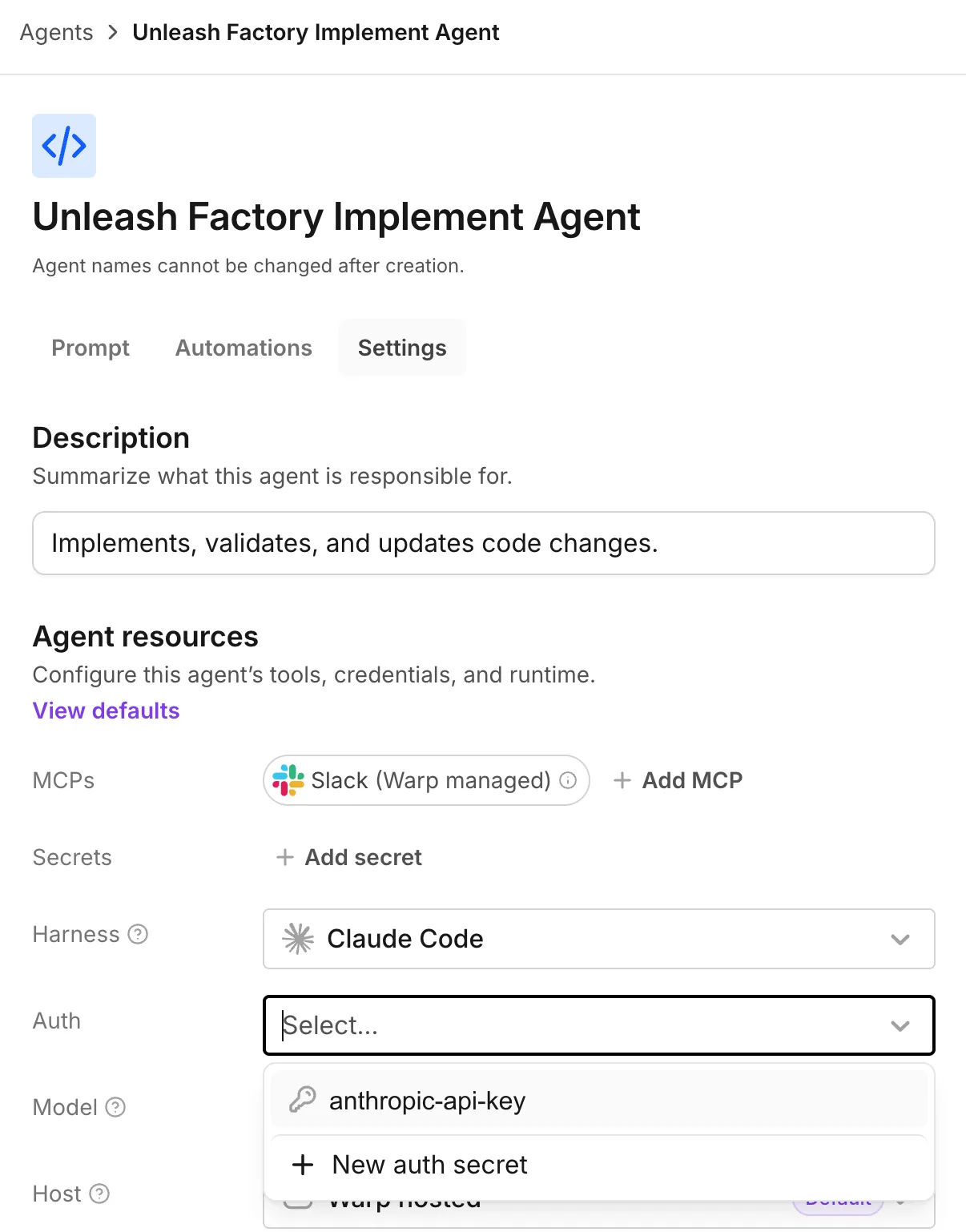
The Auth dropdown appears when a third-party harness is selected. -
In the “Model” dropdown, choose a model from that harness’s catalog.
-
In the top-right corner, click Save.
With a Warp-managed factory, you can edit harness, auth, and model from the dashboard. A GitHub-backed factory sets them through agentDefaults.harness or a per-agent harness override in the definition files. For an example, see 03-multi-harness.
Related pages
Section titled “Related pages”- About factory agents - Understand responsibilities and human decision points
- Creating custom agents
- Factory skills
- Definitions as code